Manage Your Tasks Like git: ud pull / push Local Bidirectional Sync
In one sentence:
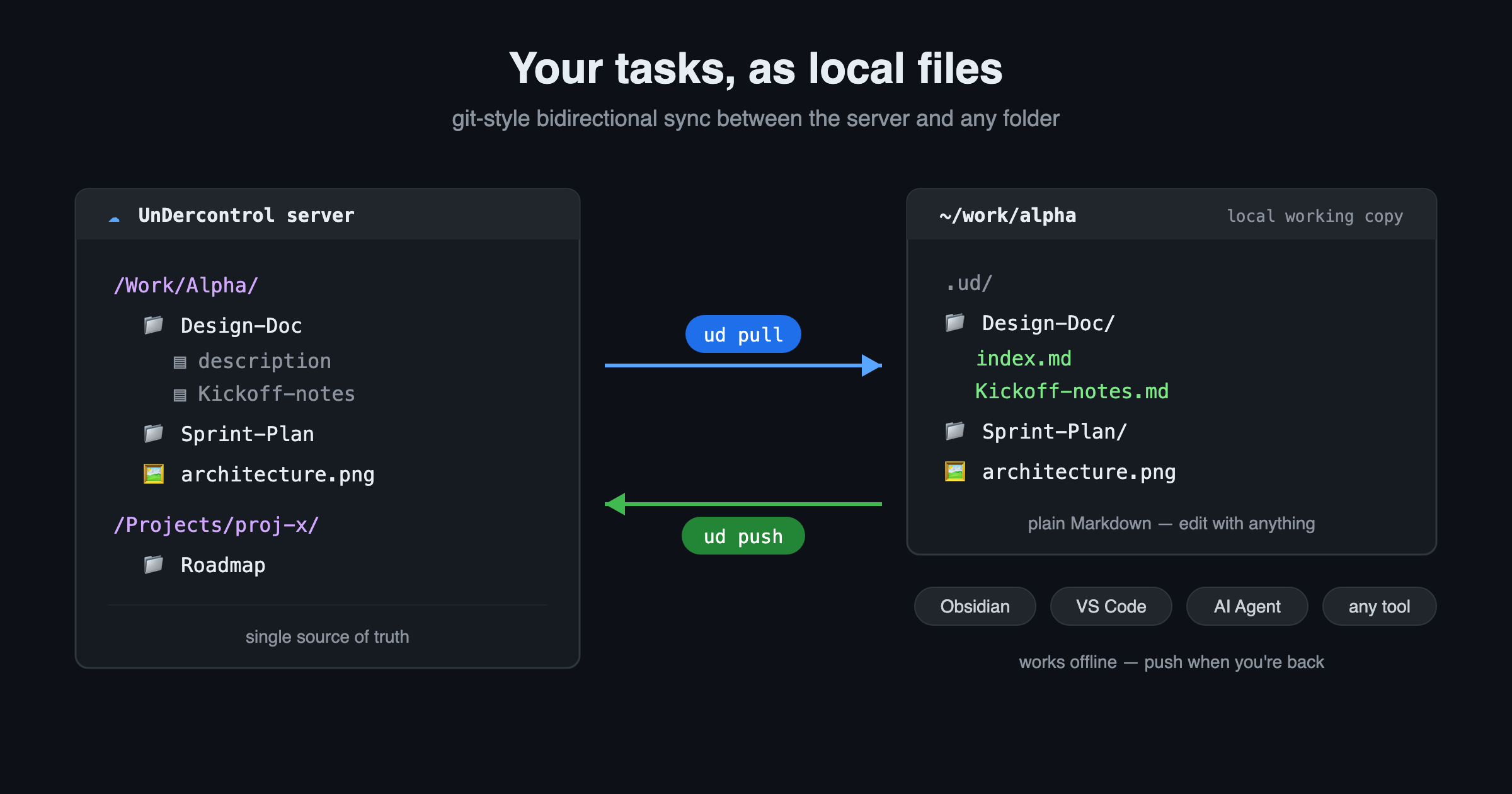
ud pullchecks your cloud tasks, notes, and attachments out as local Markdown files, andud pushsends your local edits back. As natural asgit cloneandgit push.Many working copies, one server, edit from anywhere.
Why we built this
UnDercontrol has always been built on one core belief: your data is yours. Tasks, notes, ledgers, resources — every piece of text is plain Markdown, never locked into any single app.
But "exportable" isn't enough. What developers actually want is to treat that content as local files — edit it with their favorite editor, feed it to AI tools, and sync the changes back when done.
So we built a git-style command-line sync: ud init / ud pull / ud push / ud status. There are no new concepts to learn — if you know git, you already know how to use it.
Three commands, the exact same mental model as git
| ud command | git equivalent | What it does |
|---|---|---|
ud pull /Work/Alpha/ | git clone | Check a cloud virtual directory out into the current folder and bind them |
ud status | git status | See what changed locally and remotely |
ud push | git push | Push local changes back to the cloud |
ud init /Work/Alpha/ | git init | Publish an existing local folder as a cloud directory |
The first ud pull /Work/Alpha/ binds the current directory to the virtual path /Work/Alpha/: a .ud/ folder appears to hold sync state (just like .git/), and the contents of /Work/Alpha/ land directly in the folder. Every ud pull after that is incremental — only changed items are downloaded.
# In an empty folder, init + checkout in one step
ud pull /Work/Alpha/

# Later: incrementally pull all tracked paths
ud pull

# See what changed on both sides
ud status

# Push local changes back (shows a change list for confirmation first)
ud push
What it looks like locally: a task is a folder, a note is a file
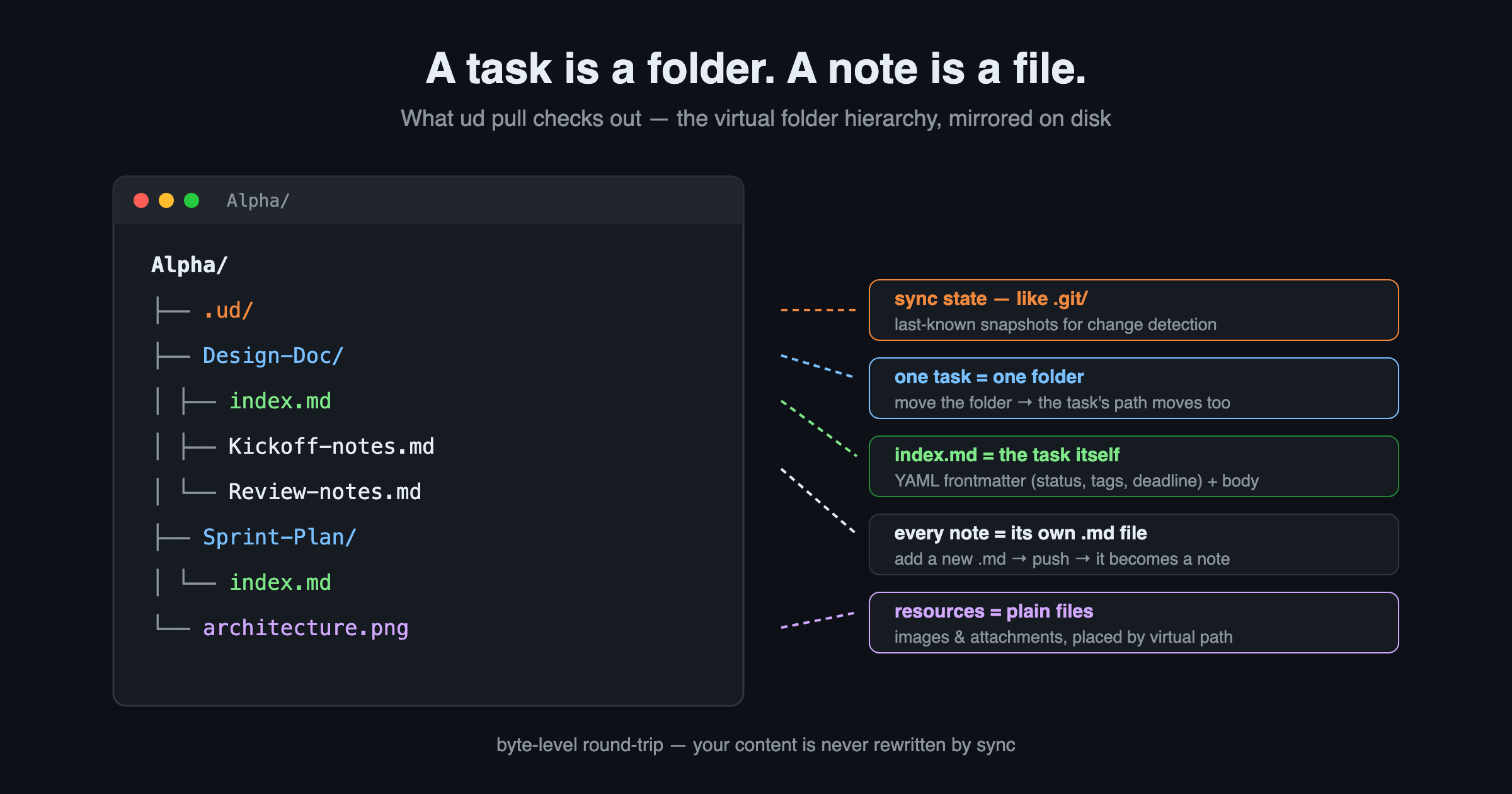
The checked-out structure exactly mirrors the virtual folder hierarchy inside UnDercontrol:
Alpha/
├── .ud/                      # sync state (like .git/)
│   └── tracking.json
├── Design-Doc/               # one task = one folder
│   ├── index.md              # task body (YAML frontmatter + description)
│   ├── Kickoff-notes.md      # every note = one .md file
│   └── Review-notes.md
├── Sprint-Plan/
│   └── index.md
└── architecture.png          # resources = plain files, placed by virtual path
Open index.md and it's clean Markdown:
---
id: 8f3c...
title: Design Doc
status: in-progress
tags: [design, alpha]
deadline: 2026-07-20
---

## Background
The task description body goes here…
A few deliberate design choices:
- Content is stored verbatim — in-app links like
resource://,task://, andnote://stay exactly as they are. Sync is a byte-level round-trip; your content is never rewritten. - The virtual path is not written into frontmatter — the folder's location on disk is the single source of the path. Want to move a task to another directory? Move the folder locally, and
ud pushupdates the cloud path. - File names are sanitized, with the original names kept in
.ud/tracking.json— special characters and non-ASCII names are handled for you.
On push, ud figures out what you did
ud push compares your working directory against the "last known state" in .ud/tracking.json, item by item, and infers the right action:
| What you did locally | What ud push does |
|---|---|
Created a task folder (with index.md), or a loose .md | Creates a task |
Added a new .md inside a task folder | Creates a note on that task |
Added a non-.md file | Uploads it as a resource |
| Edited index.md / a note / a resource file | Updates it in the cloud |
| Moved a file/folder to another directory | Updates the cloud virtual path |
| Deleted a file/folder | Soft-deletes in the cloud (recoverable) |
In other words: create a My-Idea.md file locally, run ud push, and it becomes a task in UnDercontrol. And the other way around: a task created in the cloud shows up locally after ud pull. Truly bidirectional.
Conflicts: like git, nothing gets silently overwritten
If the same task was modified both locally and in the cloud, ud marks it as a conflict:
ud pushskips conflicting items by default (and tells you to pull first), or use--forceto overwrite the cloud.ud pullkeeps the local version by default, or use--keep-remoteto let the cloud win.- In an interactive session, it asks you item by item which version to keep.
Run ud status first, then decide — no data is ever silently lost.
Many working copies, one server, anywhere
In git's model, one origin can have any number of local clones. ud works the same way — on top of one server, you can have any number of local tracked folders, each bound to a different virtual path:
Laptop              Desktop            Another Mac / server
~/work/alpha  →     D:\notes\alpha  →   ~/proj-x
  binds /Work/Alpha/   binds /Work/Alpha/  binds /Projects/proj-x/
        \                 |                    /
         \                |                   /
          ┌──────────────────────────────────┐
          │      one UnDercontrol server      │
          │ (virtual folders = source of truth)│
          └──────────────────────────────────┘
This buys you a few very practical things:
- One repo per place, fully independent:
/Work/Alpha/and/Projects/proj-x/are separate tracking roots, each with its own.ud/state. Check out only the slice you care about right now instead of pulling your entire knowledge base. - View and edit from anywhere: on any device,
ud pullgets you the latest, andud pushsyncs your edits to everyone and every client. On your phone? Just open the Web or desktop App — same server, same data. - Humans and AI share one source of truth: you edit in Obsidian on your laptop, an AI agent edits via the CLI on a server, teammates edit in the App — everything converges on the same virtual path on the same server, and
ud statusalways shows who changed what.
In short: the server is the single source of truth, and local folders are just its working copies. It's the model git has validated for twenty years — applied to your tasks and knowledge base instead of code.
Not just tasks: your whole knowledge base as files
This part matters: UnDercontrol's Markdown editor is shared across every text surface — tasks, notes, even the memo fields on expenses and accounts are all the same Markdown. So what ud pull checks out isn't an isolated "todo-list export" — it's a local mirror of your entire knowledge base, ready to be opened, edited, and pushed back with any tool.
Typical scenarios
- Manage tasks in Obsidian / VS Code:
ud pullinto your vault, enjoy your familiar editor, keybindings, and plugins, thenud pushwhen done. - Let AI agents read and write your tasks directly: hand the synced folder to Claude Code, Codex, OpenCode, or any terminal-based agent — it can read task context, append notes, even batch-create tasks, because to the agent they're just ordinary local
.mdfiles. - Keep tasks next to your code: run
ud init /Projects/proj-x/in the project root and version design docs and decision records right alongside the code. - Write offline: edit local files on a plane or in the subway; one
ud pushsyncs everything once you're back online. - Local backup: a single
ud pullis a plain-text, human-readable, never-expiring full backup.
Get started in three steps
UnDercontrol is a workbench that puts tasks, knowledge base, and AI agents in one place, with a desktop App and self-hosting support — your data stays private, portable, and yours.
1️⃣ Install the CLI (30 seconds)
npm install -g @oatnil/ud
# Don't want to install? Use npx:
npx @oatnil/ud --help
2️⃣ Pull, then edit with whatever you like
ud pull /Work/     # check a virtual directory out locally
ud status          # see what changed on both sides
ud push            # push it back
3️⃣ Grab the desktop App / self-host your own server
Want a GUI, multi-device access, or the whole server running on your own machine? See the links below.
Start here
- 🏠 Website & docs: oatnil.com
- 📦 CLI installation guide: oatnil.com/docs/cli
- 💻 Desktop App & self-hosting: oatnil.com/subscribe
Your data, your format, your tools. UnDercontrol just makes them flow — try it now with npm install -g @oatnil/ud.