Why Your Board Won't Show What You Actually Care About
Monday morning, you open the board. What you want to know is what's about to blow up: what's already overdue, what's due this week. The board only tells you what's In Progress.
There's a lot it won't show you. You want to see work by client, by sprint, by document type — there's no option for that. You want to pull the unassigned tasks into their own column — also no. You want one column watching overdue items, one watching this week's urgent ones, one just holding whatever was touched most recently, all mixed together — can't do it. The only things you can really change are the column names and their order.
So the board shows you the tool's idea of your work, not yours. The dimensions you care about, it can't hold a single one.
Why most tools work this way
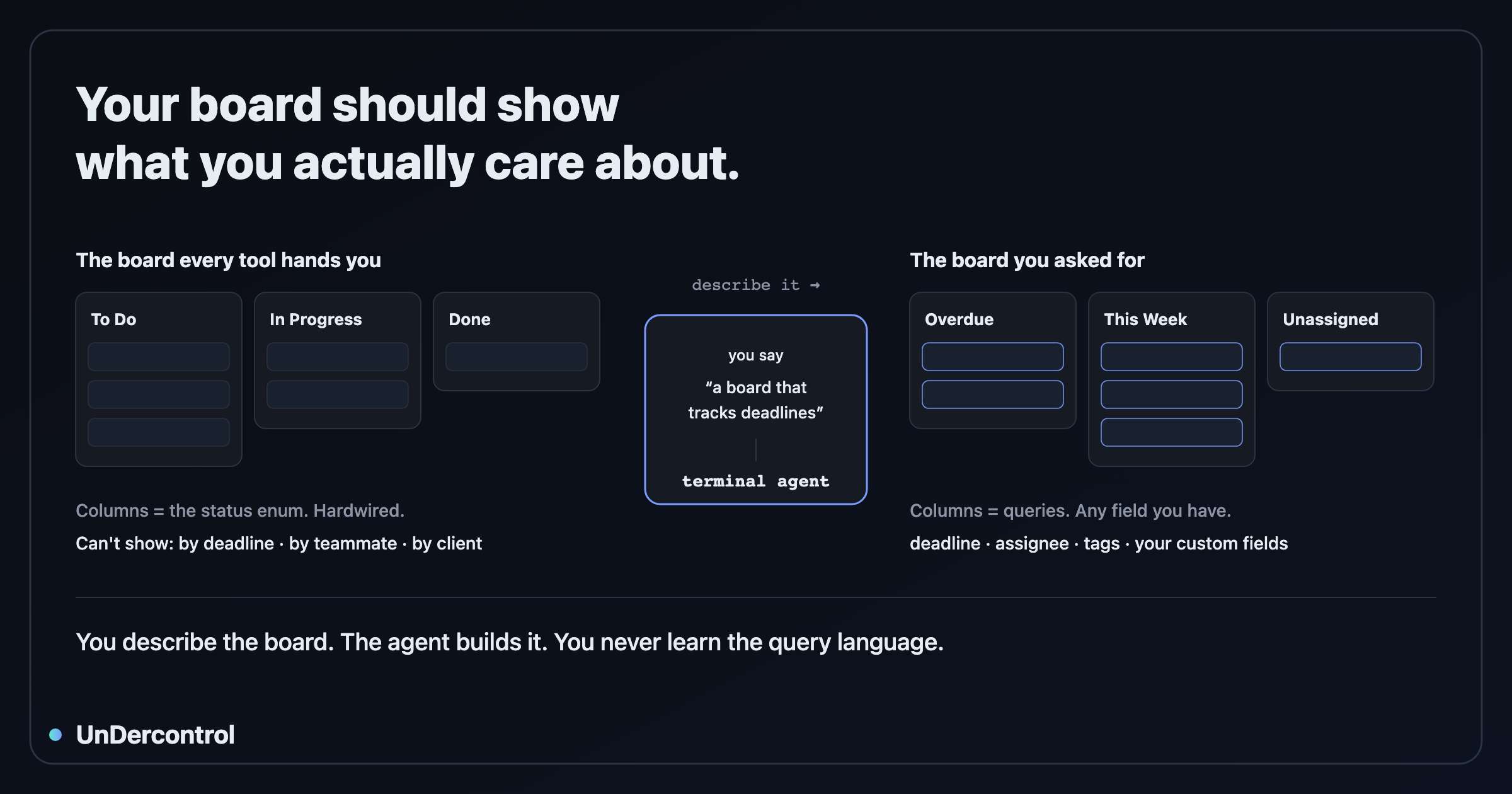
This isn't one tool's problem. Switch to another and you'll probably still get Todo, In Progress, Done. Most tools look alike because they share an assumption underneath: a column isn't something you define — it is the status enum, hardwired. What you drag a card into is an enum value, not a viewpoint you decide.
Tools have a reason for this. Flexibility usually costs you tuition. A tool that lets a column be anything tends to hand you a query language, a docs site, and a weekend along with it. Most people don't want to pay that, which is fair, so the tool decides for you: three columns, don't overthink it.
UnDercontrol takes a different route. It's a task and knowledge management tool where the day-to-day operations can be handled by an AI agent in your terminal and a command line. On a board, that means a column is no longer equal to a status — it's a condition: what kind of task belongs here. Status is just one condition among many, with no special standing. You can split by due date, by person, by tag, by your own custom field, because to the system these are all the same thing.
As for that tuition, we'll get to how it's waived.
Even the out-of-the-box board isn't only statuses
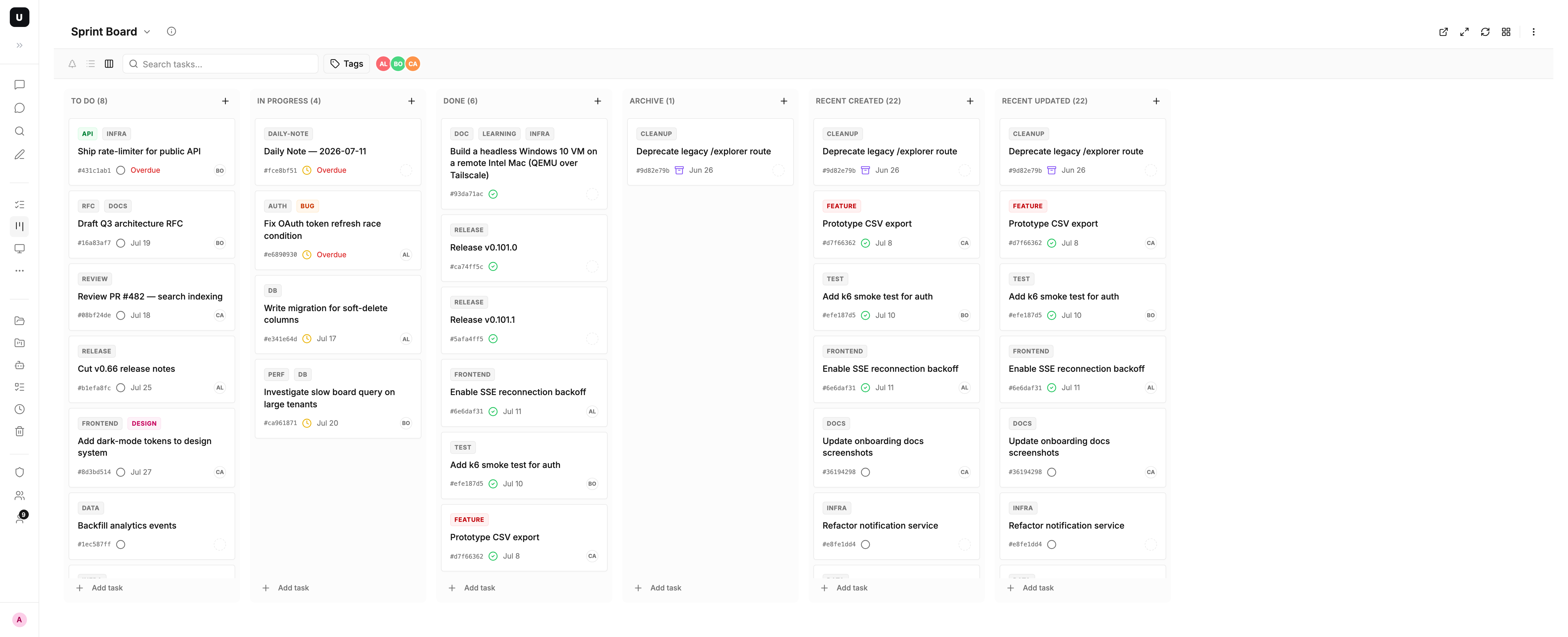
That sounds like a promise until you see it. Create a new board and two of the six default columns aren't statuses at all:
| Column | What it holds |
|---|---|
| To Do | Todo tasks |
| In Progress | In-progress tasks |
| Done | Done tasks |
| Archive | Archived tasks |
| Recent Created | The most recently created, whatever the status |
| Recent Updated | The most recently touched, whatever the status |
The last two have no filter at all — they just sort by time, newest first. They don't belong to any status. They're a viewpoint.
In a tool where a column equals a status, columns like those are hard to express. Here they're unremarkable, part of the default setup.
So what about the tuition?
If it's this flexible, doesn't that mean I have to learn a syntax before I can assemble the board I want?
No. You just say what you want.
You: build me a board that tracks deadlines — overdue, this week, next week, and no deadline set. Four columns.
That's it. Claude Code, Codex, OpenCode, or any agent running in your terminal takes it from there. What the fields are called, how the conditions are written, what the YAML looks like, which commands to run — all of that is its job.
The query language does exist, and it's complete, but it isn't your homework. It's the agent's working language. You hire someone to renovate; you don't need to lay the bricks yourself.
If you're curious, here's what it wrote for you, without you typing a character:
kind: Board
spec:
  name: Deadline Radar
  columns:
    - name: Overdue
      query: "deadline < now AND status != 'done'"
    - name: This Week
      query: "deadline BETWEEN now AND +7d"
Nice if you can read it, and it makes no difference to your use if you can't. That's the point.
And you don't have to teach the agent either
Normally, to get an agent to use some tool, you first write it a manual: how to call it, what the fields are named, what the format is. You teach it once, the tool ships an update, the manual goes stale, and the agent starts making things up.
UnDercontrol's command line ships with a recipe catalog. The agent doesn't read source and you don't feed it docs — it asks ud cook board and the tool tells it how to build a board, complete with a runnable example. Its whole learning step is one command. The tool knows how to use itself, so you neither learn it nor teach it.
Drag a card in, and the board makes it true
There's another half to the flexibility: how these columns respond to a drag is something no one has to configure.
The logic is plain. A column says it holds in-progress tasks. Drop a card into it, and the only reasonable meaning is to make that true, so the status flips to in-progress on its own. Another column says it holds cards tagged blog; drop one in and the tag is added, drag it out and the tag comes off.
You only said what each column holds; how to do it, the system works out itself. There's a quiet benefit to that: a column's description and its behavior can't drift apart, because the second is derived from the first — there's no second copy of the config to go wrong.
It knows when not to act
Say a column is for what's already overdue. You drop a card into it — should the system change the deadline to yesterday?
That's a guess. It's probably not what you meant; you may have just dropped it in the wrong place. So it does nothing. Any condition that can't be satisfied by one honest write — time ranges, sorting, fuzzy matching — generates no action at all. Those columns become views you look at, and you can't break them by dragging.
Here's the real output, a four-column deadline radar:
  Columns:
    1. Overdue
       query: deadline < now AND status != 'done'
    2. This Week
       query: deadline BETWEEN now AND +7d
    3. Recently Touched
       query: ORDER BY updated_at DESC
    4. Urgent
       query: tags CONTAINS 'urgent'
       on enter: ADD tags 'urgent'  (auto)
       on exit: REMOVE tags 'urgent'  (auto)
The first three — overdue, this week, recently touched — have no actions at all; they're read-only views. The fourth, Urgent, is defined by a tag, which one write can satisfy, so dropping a card in adds the tag and dragging it out removes it, all marked (auto), none of it configured by hand.
The system won't invent a write it can't account for. That restraint isn't a shortfall in capability; it's exactly what lets "a column can be anything" be handed to you safely.
You see the real thing before it exists
Handing board-building to an agent, the natural worry is what happens if it gets it wrong and makes a mess of your workspace.
It won't, because there's a gate in the middle. The agent runs a preview first: the system renders the board exactly as it would be created — what each column holds, what a drag would do, all laid out — and then stores nothing.
Dry run — board would be created (nothing persisted):
  Name:  Blog Pipeline
  Type:  shared  (a group "Board: Blog Pipeline" would be created for sharing)
  Default tags: blog
  Columns:
    1. Idea
       query: status = 'todo' AND tags CONTAINS 'blog'
       on enter: SET status = 'todo'  (auto)
       on enter: ADD tags 'blog'  (auto)
       on exit: REMOVE tags 'blog'  (auto)
    2. Drafting
       query: status = 'in-progress' AND tags CONTAINS 'blog'
       on enter: SET status = 'in-progress'  (auto)
       ...
Note the nothing persisted. At this point nothing has happened yet.
So the whole thing becomes: you describe it, the agent previews it, you look at the real result, and if it's off you say change the review column to pending, it previews again, you nod, it lands.
The key is that you're reviewing the system's output, not the agent's account of its plan. The agent can say the wrong thing, but it can't fake this step's output. So the trust here isn't built on the agent never being wrong — it's that being wrong is fine, because you see it first.
Where this shows up
Enough mechanism. Here's where it actually lives.
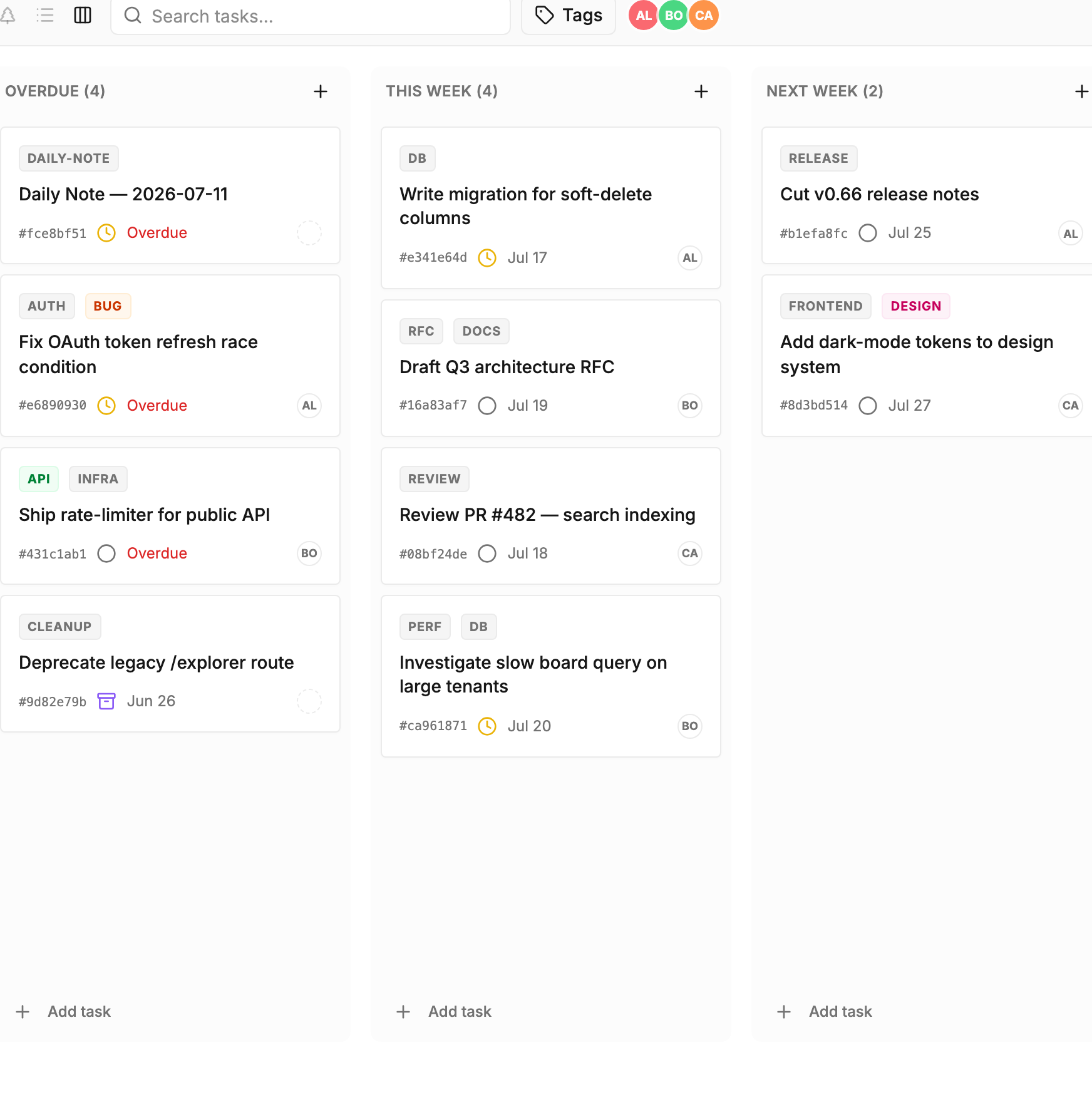
The Monday-morning deadline radar
You've got seven or eight things going at once, and on Monday morning there's only one thing you want to know: what's about to blow up.
Tell an agent to build a board that tracks deadlines — overdue, this week, next week, no deadline set — and the four columns are there. Every Monday after that, whether the overdue column has anything in it is a glance.
This board has a reassuring property too: those columns are computed from time, so you can't break them. If you fumble a card into Overdue, the system won't take it upon itself to change your deadline to yesterday — it does nothing. Columns like these are made to be looked at.
A team workload view
Anyone running a team has had the question: who's buried, and who's actually free?
A board with one column per teammate answers it, with a last column for the unassigned. Open it at standup and whose column is stacked, which work is still hanging, you can see without asking.
A board like this is for looking. It flattens work scattered everywhere onto one screen. When you actually need to change who does what, you go back to the task itself.
A content pipeline
Blogging, videos, announcements — underneath they're the same pipeline: idea, drafting, review, published.
This is a board you drag on. Move a card from Drafting to Review and the status follows, the tag is added, because each column has stated what it holds and the system derives the rest. You just drag; it makes what you said come true.
The plan changed, so say one more sentence
Two weeks in, you notice there's no home for archived items. Tell an agent to add an archived column; it takes the board's full current state, previews the change for you, and only lands it once you nod.
In another tool, changing a board means clicking through it again. Here it's a sentence, and getting it wrong doesn't matter, because you saw it before it took effect.
Once it's built, it's still yours
That "add an archived column" works because the board isn't a trail left by clicks — it's something you can lift out whole.
Export it, edit it, put it back — all fine. That's also why the agent never has to guess when it changes the board: it gets the full current state, not a reconstruction from the UI.
A side benefit: the board can go into git, be handed to a colleague, be copied to another project. It's an asset of yours, not config locked inside some screen.
Your board, your design, none of the homework
Boards all look alike because the tool made the trade-off for you: simple but dumb, or powerful but you have to learn it.
UnDercontrol's answer is that you decide what you want, the agent handles how, and the system keeps it from doing the wrong thing.
So the four-column deadline radar, the by-person team view, the board sliced along your own business dimension — none of these are features someone designed ahead of time. They're just the result of a sentence you said.
If you want to try it, describe the board you want to your agent. It knows what to do from there.